< Back
AGGREGATE function
Post
AGGREGATE function
This article describes the formula syntax and usage of the AGGREGATE function in Microsoft Excel.
Description Returns an aggregate in a list or database. The AGGREGATE function can apply different aggregate functions to a list or database with the option to ignore hidden rows and error values.
Syntax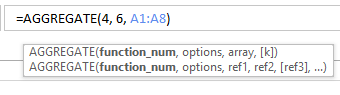
The AGGREGATE function syntax has the following arguments:
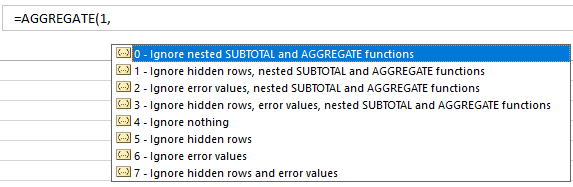
Remarks Function_num:
This article describes the formula syntax and usage of the AGGREGATE function in Microsoft Excel.
Description Returns an aggregate in a list or database. The AGGREGATE function can apply different aggregate functions to a list or database with the option to ignore hidden rows and error values.
Syntax
- Reference form AGGREGATE(function_num, options, ref1, [ref2],...)
- Array form AGGREGATE(function_num, options, array, [k])
The AGGREGATE function syntax has the following arguments:
- Function_num Required. A number 1 to 19 that specifies which function to use.
| Function_num | Function |
| 1 | AVERAGE |
| 2 | COUNT |
| 3 | COUNTA |
| 4 | MAX |
| 5 | MIN |
| 6 | PRODUCT |
| 7 | STDEV.S |
| 8 | STDEV.P |
| 9 | SUM |
| 10 | VAR.S |
| 11 | VAR.P |
| 12 | MEDIAN |
| 13 | MODE.SNGL |
| 14 | LARGE |
| 15 | SMALL |
| 16 | PERCENTILE.INC |
| 17 | QUARTILE.INC |
| 18 | PERCENTILE.EXC |
| 19 | QUARTILE.EXC |
- Options Required. A numerical value that determines which values to ignore in the evaluation range for the function. Note: The function will not ignore hidden rows, nested subtotals or nested aggregates if the array argument includes a calculation.
| Option | Behavior |
| 0 or omitted | Ignore nested SUBTOTAL and AGGREGATE functions |
| 1 | Ignore hidden rows, nested SUBTOTAL and AGGREGATE functions |
| 2 | Ignore error values, nested SUBTOTAL and AGGREGATE functions |
| 3 | Ignore hidden rows, error values, nested SUBTOTAL and AGGREGATE functions |
| 4 | Ignore nothing |
| 5 | Ignore hidden rows |
| 6 | Ignore error values |
| 7 | Ignore hidden rows and error values |
- Ref1 Required. The first numeric argument for functions that take multiple numeric arguments for which you want the aggregate value.
Ref2,... Optional. Numeric arguments 2 to 253 for which you want the aggregate value.
For functions that take an array, ref1 is an array, an array formula, or a reference to a range of cells for which you want the aggregate value. Ref2 is a second argument that is required for certain functions. The following functions require a ref2 argument:
| Function |
| LARGE(array,k) |
| SMALL(array,k) |
| PERCENTILE.INC(array,k) |
| QUARTILE.INC(array,quart) |
| PERCENTILE.EXC(array,k) |
| QUARTILE.EXC(array,quart) |
Remarks Function_num:
- As soon as you type the function_num argument when you enter the AGGREGATE function into a cell on the worksheet, you will see a list of all functions that you can use as arguments.
- If a second ref argument is required but not provided, AGGREGATE returns a #VALUE! error.
- If one or more of the references are 3-D references, AGGREGATE returns the #VALUE! error value.
- The AGGREGATE function is designed for columns of data, or vertical ranges. It is not designed for rows of data, or horizontal ranges. For example, when you subtotal a horizontal range using option 1, such as AGGREGATE(1, 1, ref1), hiding a column does not affect the aggregate sum value. But, hiding a row in vertical range does affect the aggregate.
| #DIV/0! | 94 | |
| 25 | 32 | |
| 87 | 81 | |
| #NUM! | 66 | |
| 17 | 83 | |
| 26 | 59 | |
| 73 | 56 | |
| 19 | 36 | |
| Formula | Description | Result |
| =AGGREGATE(4, 6, A1:A11) | Calculates the maximum value while ignoring error values in the range | 87 |
| =AGGREGATE(14, 6, A1:A11, 3) | Calculates the 3rd largest value while ignoring error values in the range | 26 |
| =AGGREGATE(15, 6, A1:A11) | Will return #VALUE! error. This is because AGGREGATE is expecting a second ref argument, since the function (SMALL) requires one. | #VALUE! |
| =AGGREGATE(12, 6, A1:A11, B1:B11) | Calculates the median while ignoring error values in the range | 57.5 |
| =MAX(A1:A2) | Will return error value, since there are error values in the evaluation range. | #DIV/0! |